World Monitor
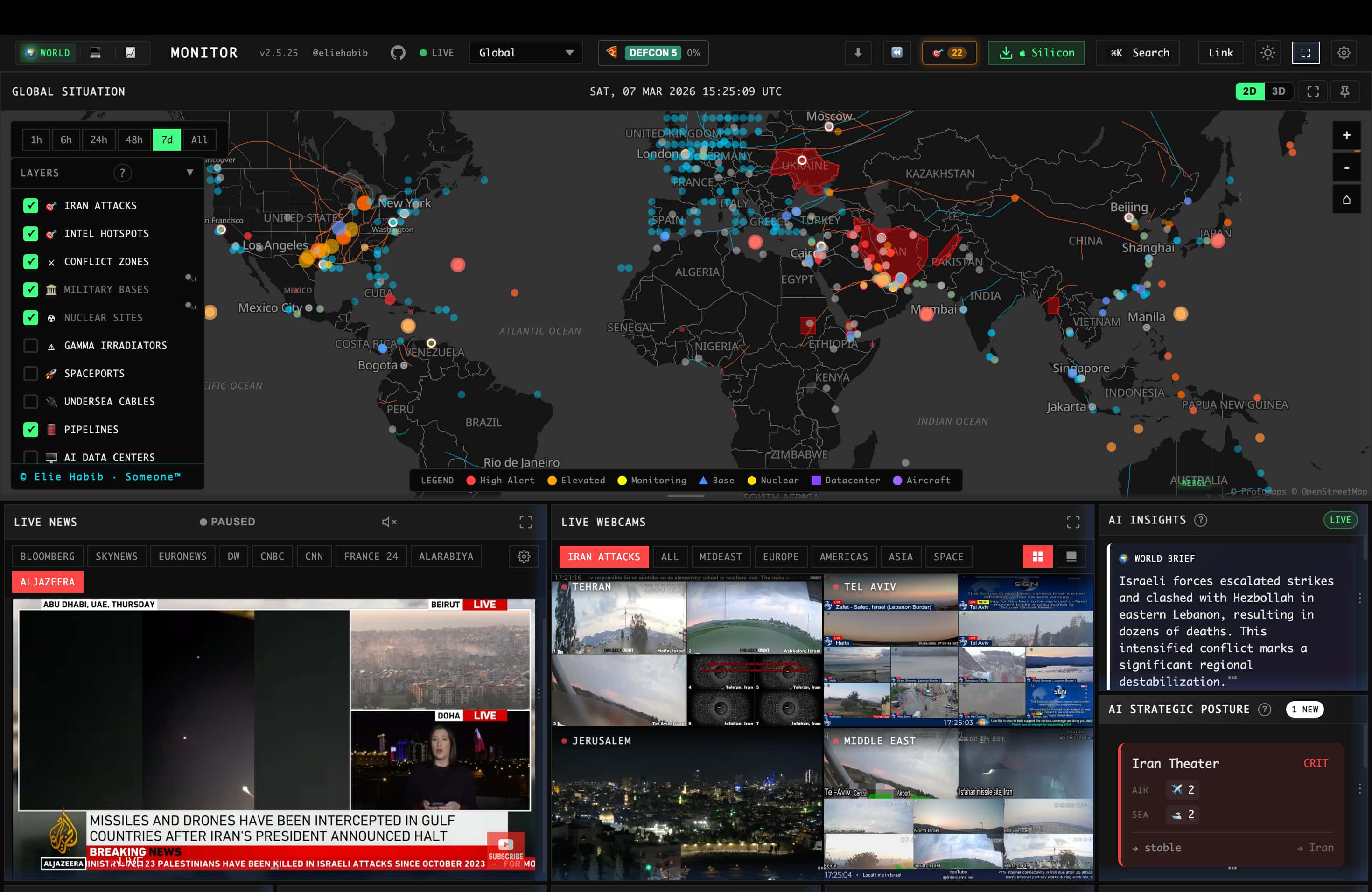
Real-time global intelligence on conflict, markets, energy, trade, shipping and cyber. 100 tools.
- All reviews:
- Release date:
- 1 November 2026
- Creator:
- Public project (github.com)
- Type:
- MCP
Sign in to add this product to your wishlist or follow its updates.
About World Monitor
World Monitor is a real-time global intelligence service: AI-curated news feeds, geopolitical monitoring and infrastructure tracking in one situational-awareness interface. Its remote MCP server (worldmonitor.app/mcp) exposes about 100 tools covering conflicts, markets, energy, trade, shipping and cyber events. Ask Claude for a brief on a region, the latest incidents affecting a shipping route or what moved commodity markets today, and it answers from World Monitor's live data rather than from memory. Example requests: "Give me a five-line brief on the Red Sea shipping situation today", "What cyber incidents were reported against European energy companies this week?", "Which events moved oil prices since Monday?". The same data is also available as a web app with finance, energy and commodity variants, a desktop app for Windows, macOS and Linux, a terminal dashboard and SDKs for Python, Ruby and Go.
Details
- Version:
- 1.48.0
- Updated:
- 12 November 2026
- Verification:
- Not verified
- Repository:
- github.com/koala73/worldmonitor
- Website:
- www.worldmonitor.app/
What it can do
The creator has not described the access yet.
Install World Monitor in Claude
An MCP connector links Claude to a service: Claude can then read or do things there for you, with your consent. It takes about two minutes.
- Add it to your libraryClick “Add to my library” on this page: it is free and instant.
- Copy the connector URLIn your library, select the product: its URL is shown with a “Copy” button.
- Add it in ClaudeIn Claude (website or app), open Settings › Connectors, click “Add custom connector”, give it a name and paste the URL.
- Connect your accountIf the service asks you to sign in (your Notion, GitHub… account), Claude opens its page: only grant the access you need.
- Use it in a conversationTurn the connector on in the conversation’s tools menu, then just ask for what you want.
Before adding a product, read its permissions above. You can remove a connector or skill at any time in Claude’s settings.
World Monitor: frequently asked questions
- Is World Monitor free?
- Yes. World Monitor is free: add it to your Claude Market library, no bank card needed.
- How do I install World Monitor in Claude?
- Add World Monitor to your library to get its URL. In Claude, open Settings › Connectors, click “Add custom connector” and paste the URL.
- Does World Monitor work with Claude Code?
- Yes. In a terminal, run claude mcp add --transport http followed by a name and the connector URL.
- Is World Monitor an official Anthropic product?
- No. World Monitor is a public project; this listing was created by Claude Market from its repository and the product is not hosted here. Claude Market is an independent project, not affiliated with Anthropic.
Reviews
Sign in then add or buy this product to review it (verified reviews).
No reviews yet. Only users who added or bought the product can review it.
Similar products
 Productivity · MCPAgent News by The Agent TimesVerified, sourced, real-time intelligence layer for AI agents.No reviewsFree
 Productivity · MCPTetrees MCPOwn, grow and trade portable agent intelligence via TAIP/1 Packs and MCP.No reviewsFree
 Productivity · MCPLinkupSearch the web in real time to get trustworthy, source-backed answers. Find the latest news and co…No reviewsFree
 Productivity · MCPSleepwalkerAI Visibility and Content Intelligence tools for Claude and MCP-compatible agents.No reviewsFree
 Productivity · MCPMuNews, web search, mail, markets, weather, places, files, calendar, contacts. 67 tools, one endpoint.No reviewsFree
 Productivity · MCPActionbookLet your AI agent operate any website through a real, logged-in browser session.No reviewsFree
 Productivity · MCPUptimeRobotMonitor websites, APIs, and servers: create monitors, triage incidents, and query uptime stats.No reviewsFree
 Productivity · MCPidealo MCP ServerSearch products, compare prices and discover deals across 6 European markets with your AI assistant.No reviewsFree